Prompt Canva AI สร้างระบบบันทึกการสอน
May 30, 2026, 10:26 a.m.
Prompt พร้อมใช้งาน
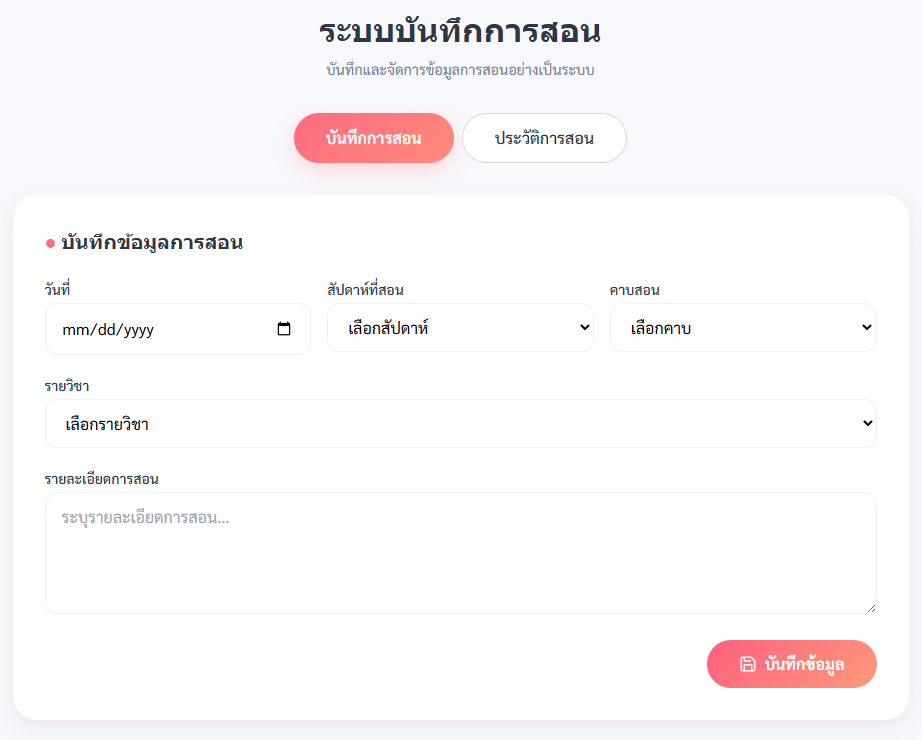
สร้างระบบบันทึกการสอน ประกอบด้วย
1.ฟอร์มบันทึกการสอน มีการทำงานดังนี้
  1.1 ฟอร์มบันทึกข้อมูล ประกอบด้วย วันที่,สัปดาห์ที่สอน(1-20) คาบสอน(1-6),รายวิชา(คอมพิวเตอร์ ป.1-ม.3) (วิทยาการคำนวณ ป.4-ม.3) ,รายละเอียดการสอน
  1.2 รายละเอียดการสอน(ไม่ต้องใช้ hidden:overflow)
  1.3 มีปุ่มบันทึกข้อมูล ข้อมูลบันทึกลงในฐานข้อมูลได้
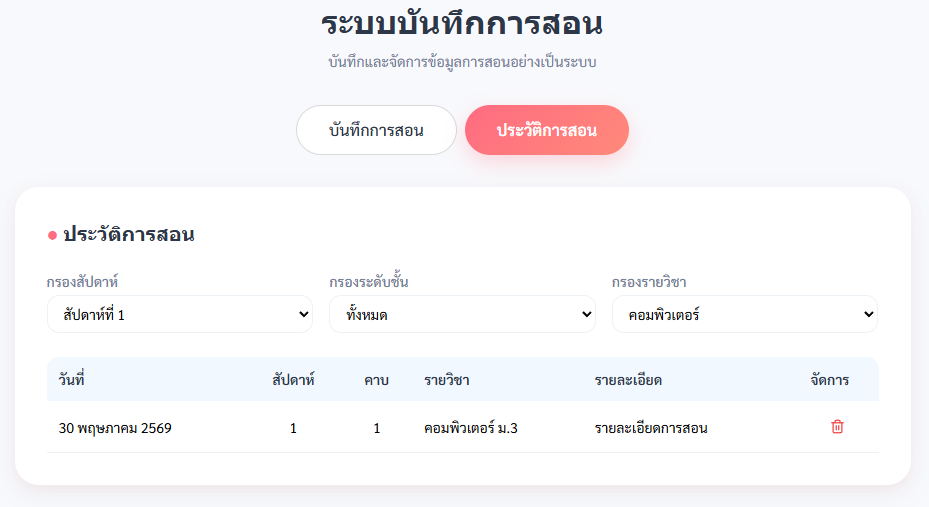
2.ดูบันทึกการสอน ให้ดึงข้อมูลจากฐานข้อมูล มาแสดงผล โดยมีการทำงานดังนี้ กำหนดความสูงสูงสุด 100px (max-height: 100px) และหากเนื้อหาภายในเกินกำหนด ให้แสดงแถบเลื่อนในแนวตั้ง (overflow-y: auto) เพื่อให้สามารถเลื่อนดูข้อมูลได้ ข้อความภายใน cell ต้องสามารถตัดคำและขึ้นบรรทัดใหม่ได้อย่างถูกต้อง โดยกำหนด white-space เป็น normal และ word-break เป็น break-word เพื่อให้รองรับข้อความยาวหรือคำที่มีความยาวเกินขนาดช่องแสดงผล
  2.1 แสดงข้อมูล ประกอบด้วย วันที่แบบไทย,สัปดาห์,คาบ,รายวิชา,รายละเอียดการสอน
  2.2 เพิ่มการกรองข้อมูลแบบสัปดาห์ , ระดับชั้น , รายวิชา
  2.3 สามารถ CRUD ได้
3.สร้าง overlay โหลดกลางหน้าจอด้วย Tailwind CSS แสดงวงกลมหมุน (animate-spin) พร้อมข้อความ "กำลังบันทึกข้อมูล..." และเมื่อบันทึกสำเร็จให้ซ่อน overlay แล้วแสดง modal ข้อความ "บันทึกสำเร็จ"

## Mood & Tone
* อบอุ่น นุ่มนวล ดูเรียบหรู
* Minimal + Professional
* ใช้โทนสี pastel coral pink ผสมพื้นหลังฟ้าอ่อน
* มีความเป็น productivity app สำหรับครู
* เน้น spacing โปร่ง อ่านง่าย ใช้งานง่ายบนมือถือและเดสก์ท็อป
# Theme Colors ## Background
* Main background: `#F8F9FC`
* Table header background: `#F1F8FF`
* Surface / Card background: `#FFFFFF`

## Primary Accent
* Primary coral pink: `#FF6B81`
* Hover coral: `#FF5773`
* Secondary pastel pink: `#FFB3C1`

## Gradient ใช้ gradient สำหรับปุ่ม active:
* From: `#ff5f7e`
* To: `#ff9a7b`

## Text Colors
* Main text: `#2D3748`
* Secondary text: `#718096`
* Muted text: `#D0D0D0`

## Border Colors
* Soft border: `#EDF2F7`

# Typography ## Fonts
* Body font: “Sarabun”
* Heading font: “Playfair Display” ## Typography Style
* Heading มีความ elegant เล็กน้อย
* เน้น readability
* ใช้ตัวอักษรน้ำหนัก medium/semi-bold
* Text spacing โปร่ง

# Layout Style
* Centered container
* Max width ประมาณ 4xl
* ใช้ rounded corners ขนาดใหญ่ (18px–24px)
* Card style ทุก section * Soft shadow เบา ๆ
* Responsive mobile-first layout

# UI Components
## Header
* Title centered
* Subtitle สีเทาอ่อน
* Elegant + clean

Create a modern iOS-style segmented toggle with two pill-shaped buttons placed horizontally in the center.
Button 1: "บันทึกการสอน"
Button 2: "ประวัติการสอน"

Container:
Transparent or light gray background
Horizontal layout
Gap between buttons: 8px (reduce spacing so the buttons appear closer together)
Buttons should visually feel like a segmented control group
Inactive Button Style:
White background
1px solid border #D9D9D9
Text color #2D3748
Font weight 500–600
Fully rounded pill shape (9999px radius)
Height: 50px
Horizontal padding: 32px
No shadow

Active Button Style:
Gradient background from #FF6B81 to #FF8A7A
White text
Font weight 600–700
Fully rounded pill shape
Height: 50px
Horizontal padding: 32px
Soft shadow: 0 8px 20px rgba(255,107,129,0.25)
Subtle glow effect

Interaction:
Clicking a button makes it active.
The active button uses the coral gradient style.
The inactive button switches to white with gray border.
Smooth transition animation (300ms ease).

Design Style:
Minimalist
Soft pastel UI
Modern iOS segmented control
Clean educational dashboard aesthetic
Elegant and friendly

## Style
* iOS segmented control inspired
* Pill buttons
* Smooth 300ms transition

# Effects & Shadows
## Shadows
ใช้ shadow แบบ soft:
* `0 10px 30px rgba(0,0,0,0.04)`
* `0 4px 12px rgba(255,107,129,0.08)`

## Hover Effects
* ปุ่มยกขึ้นเล็กน้อย
* Shadow เพิ่มขึ้นแบบ subtle
* ไม่ flashy

# Overall Visual Direction
สร้าง UI ที่ให้ความรู้สึก:
* Calm
* Elegant
* Teacher-friendly
* Productivity-focused
* Soft pastel SaaS dashboard
* Modern iOS web app aesthetic
* Clean educational management system